
MyBatis报错 org.apache.ibatis.binding.BindingException: Invalid bound statement (not found) 可能的原因
MyBatis一直报这个错,查了很久,网络上的方法都不奏效。
最终原因是创建存放xml的目录(如UserDao.xml)的时候,我是以com.michael.dao这样以点分隔的形式命名的,实际应该使用com/michael/dao,虽然创建之后显示的项目结构是一样的,但以点分隔的包名就会报错,修改为/之后就好了。
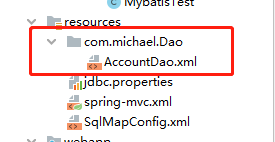

网络上获取的其它可能的原因:
1、检查xml文件的namespace是否对应接口,要是全路径。
xml文件名不需要和接口名一致,namespace和接口全类名一致即可。
2、xml中的函数id和接口中的函数名是否对得上,参数类型、返回值类型是否对得上
3、去看输出目录中有没有xml映射文件,maven项目默认把资源文件放在src/main/resources下,默认只识别src/main/resources下的资源文件。
如果你把xml映射文件等资源文件放到src/main/java的某个目录下,识别不了,需要在pom.xml中配置一下:
<resources>
        <resource>
            <directory>src/main/java</directory>
            <includes>
                <include>**/*.xml</include>
                <include>**/*.properties</include>
            </includes>
            <filtering>true</filtering>
        </resource>
        <resource>
            <directory>src/main/resources</directory>
            <includes>
                <include>**/*.xml</include>
                <include>**/*.properties</include>
            </includes>
            <filtering>true</filtering>
        </resource>
    </resources>
把资源文件的路径都写进去。
4、看一下mybatis的配置对不对
#实体类别名
mybatis.type-aliases-package=com.chy.xm_mall.model
#映射文件的位置
mybatis.mapper-locations=classpath:mapper/*.xml
5、看一下xml映射文件是否带了后缀名.xml
这个很容易被忽略,一次SpringBoot中使用MyBatis时我调了半天,其它可能性都被排除了,愣是找不到原因,最后发现是我创建映射文件时直接输入UserDaoMapper,没带后缀.xml。
你不带后缀.xml,IDEA根据文件内容能识别它是xml文件,显示的图标也是xml文件的,但不带.xml后缀就不是映射文件,运行时识别不了。